Catalog Avatar Creator Wiki
Catalog Avatar Creator Wiki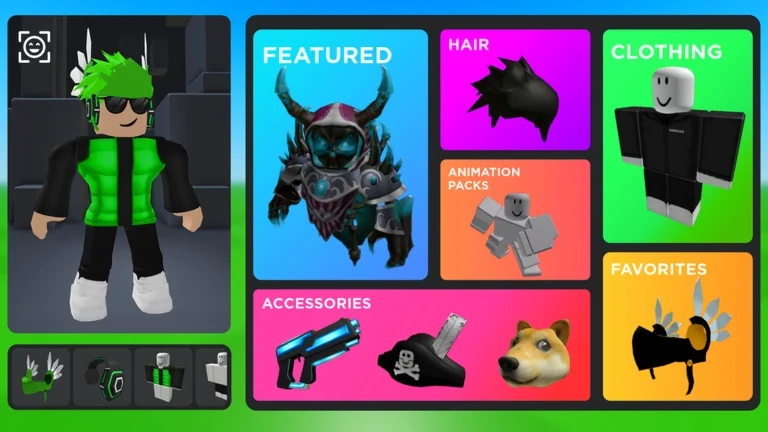
Explore avatar items, try outfit combinations, adjust accessories, and save looks in Catalog Avatar Creator on Roblox.
Recent Updates
Beginner Guide
Clone Yourself
Commands
Freecam
How to Use
Remove Clones
Catalog Avatar Creator Codes
Accessory Limit
Start Here
Get Started with Catalog Avatar Creator
Beginner Guide
Learn how catalog previews work, how to try on items, and what changes when you buy an item.
Find Outfit Ideas
Browse community-created outfits and use them as references for your own avatar style.
Save an Outfit
Keep a finished look on your Roblox account so you can equip it outside the experience.
Customize Accessories
Adjust an equipped accessory’s color, position, rotation, or size and review the preview.
Popular Pages
Explore Catalog Avatar Creator Guides
Beginner Guide
Learn how to use Catalog Avatar Creator in Roblox: find the verified experience, try items, customize looks, and see which purchases persist.
Clone Yourself
Learn Catalog Avatar Creator how to clone yourself with the /clone chat command or the Effects menu, plus reset tips and fixes.
Commands
Every Catalog Avatar Creator command in one place: what /r6, /headless, /vip, /clone, and /speed do, plus how to type them and when to use each one.
Freecam
Use the Catalog Avatar Creator freecam to frame outfits, check layering, and capture cleaner avatar screenshots with practical angles and simple fixes.
How to Use
Learn how to use Catalog Avatar Creator to test outfits, customize accessories, remove items, and decide what to buy before spending Robux.
Remove Clones
Learn how to handle clones in Catalog Avatar Creator, what /clone and /npc do, and which commands can reset a crowded avatar session.
Catalog Avatar Creator Codes
Catalog Avatar Creator codes: no reward codes are listed as working in October 2026. Learn /redeem steps and how outfit codes differ.
Accessory Limit
Learn how to plan around the Catalog Avatar Creator accessory limit with theme priorities, build checks, and clear answers for cleaner avatar looks.
Adjust Accessories
Learn how to adjust accessories in Catalog Avatar Creator with clear steps for transparency, color, texture, rotation, position, and size changes.
Find Item IDs
Learn how to find and verify a Catalog Avatar Creator item ID, spot unreliable code lists, and use avatar accessory IDs safely.
Layered Clothing Order
Learn a reliable Catalog Avatar Creator layered clothing order so shirts, jackets, and accessories stack cleanly — plus fixes for clipping and overlap.
Move Accessories
Learn how to move accessories in Catalog Avatar Creator with the Effects panel and Transform Item tool — position, rotation, size, color, and transparency.
Resize Accessories
Learn how to resize accessories in Catalog Avatar Creator using the transform item tool, plus tips for transparency, color, and custom textures.
Buy Outfits
A clear walkthrough of Catalog Avatar Creator how to buy outfits in bulk: save a look, use the buy-all button, and check the Robux total first.
Copy Outfits
Learn Catalog Avatar Creator how to copy outfits: what the /export command does, where copying breaks down, and how to keep a reusable look.
Find Favorites
Learn how to find favorites in Catalog Avatar Creator, star items in the catalog, sort the list, and turn saved favorites into outfits you can wear.
Hide Outfits
Learn how to hide outfits in Catalog Avatar Creator using the Player settings toggle, what changes when your look is private, and how to show it again.
Outfit Codes
Learn where to find Catalog Avatar Creator outfit codes, how to enter and wear them, and how they differ from /redeem codes in this Roblox game.
Outfit Ideas
Fresh Catalog Avatar Creator outfit ideas: faceless looks, layered fits, hair swaps, and quick fixes you can copy in-game with free cam and the catalog.
Save Outfits
Learn Catalog Avatar Creator how to save outfits to your Roblox account, where to find them afterward, and what to do when a saved look doesn't show up.
Avatar Poses
Learn how Catalog Avatar Creator poses work, from move and rotate tools to accessory attachment and Motor6D limb adjustments for cleaner Roblox avatars.
Background IDs
Learn how to use a Catalog Avatar Creator background ID, pick a backdrop that fits your avatar, and avoid common scene-building mistakes.
Change Body Scale
Learn how to change body scale in Catalog Avatar Creator, tune Height, Width, Head, and Proportions, and reduce layered clothing clipping.
Change Skin Color
Learn how to change skin color in Catalog Avatar Creator, set a base tone that survives outfit codes, and fix resets, clipping, and scale issues fast.
Get Headless
Learn Catalog Avatar Creator how to get headless with a clear step-by-step walkthrough, outfit tips, and fixes for common mistakes.
Switch to R15
Learn the quick Catalog Avatar Creator how to switch to R15 steps: open Catalog, find Body, choose Scale, select R15, and close the menu.
Switch to R6
Want to know Catalog Avatar Creator how to switch to R6? Use the Body scale menu or type /R6 in chat — here's the exact step-by-step for both methods.
Inappropriate Avatar Detected
Hit with a Catalog Avatar Creator inappropriate avatar detected warning? Learn what triggers the flag, how to rebuild a clean avatar, and what to do next.
Items Not Showing
Fix Catalog Avatar Creator items not showing with clear causes and step-by-step solutions for loaders, invisible assets, and missing purchases.
Keeps Crashing
Troubleshoot Catalog Avatar Creator keeps crashing on Roblox. Separate real crashes from catalog search bugs, reset the app, and contact support.
Not Loading
Catalog Avatar Creator not loading? Learn why avatars, outfits, and items fail to appear and follow step-by-step fixes for Roblox on PC and mobile.
Not Saving Outfits
Catalog Avatar Creator not saving outfits? Learn why saves fail, how to verify an outfit, and the steps that keep your look intact.
Not Working
Catalog Avatar Creator not working? Learn why search, saving, and accessories fail, plus practical fixes and when a Roblox-side bug is the cause.
Boombox
Learn how the Catalog Avatar Creator boombox works: the free Monstercat playlist, three premium playlists, custom sound IDs, and proximity audio.
Booth
Learn how the Catalog Avatar Creator booth works: type /booth, place it, hold E to edit the text, and use related commands for a better avatar showcase.
Gears
Learn how to find and try Catalog Avatar Creator gears, toggle private-server access, and test standout gear picks without wasting time.
Get Big
Learn Catalog Avatar Creator how to get big with size potions, height settings, and shareable codes, plus fixes for avatars that stay stubbornly small.
Use VR
Learn how to use VR with Catalog Avatar Creator to design Roblox avatars, preview outfits, and make better choices before joining VR sessions.
Join the Discord
Learn how the Catalog Avatar Creator Discord works, how to join, use outfit import commands, and make the most of the Roblox avatar editor community.
Beginner Guide
Learn how to use Catalog Avatar Creator in Roblox: find the verified experience, try items, customize looks, and see which purchases persist.
Clone Yourself
Learn Catalog Avatar Creator how to clone yourself with the /clone chat command or the Effects menu, plus reset tips and fixes.
Commands
Every Catalog Avatar Creator command in one place: what /r6, /headless, /vip, /clone, and /speed do, plus how to type them and when to use each one.
Freecam
Use the Catalog Avatar Creator freecam to frame outfits, check layering, and capture cleaner avatar screenshots with practical angles and simple fixes.
How to Use
Learn how to use Catalog Avatar Creator to test outfits, customize accessories, remove items, and decide what to buy before spending Robux.
Remove Clones
Learn how to handle clones in Catalog Avatar Creator, what /clone and /npc do, and which commands can reset a crowded avatar session.
Catalog Avatar Creator Codes
Catalog Avatar Creator codes: no reward codes are listed as working in October 2026. Learn /redeem steps and how outfit codes differ.
Accessory Limit
Learn how to plan around the Catalog Avatar Creator accessory limit with theme priorities, build checks, and clear answers for cleaner avatar looks.
Adjust Accessories
Learn how to adjust accessories in Catalog Avatar Creator with clear steps for transparency, color, texture, rotation, position, and size changes.
Find Item IDs
Learn how to find and verify a Catalog Avatar Creator item ID, spot unreliable code lists, and use avatar accessory IDs safely.
Layered Clothing Order
Learn a reliable Catalog Avatar Creator layered clothing order so shirts, jackets, and accessories stack cleanly — plus fixes for clipping and overlap.
Move Accessories
Learn how to move accessories in Catalog Avatar Creator with the Effects panel and Transform Item tool — position, rotation, size, color, and transparency.
Resize Accessories
Learn how to resize accessories in Catalog Avatar Creator using the transform item tool, plus tips for transparency, color, and custom textures.
Buy Outfits
A clear walkthrough of Catalog Avatar Creator how to buy outfits in bulk: save a look, use the buy-all button, and check the Robux total first.
Copy Outfits
Learn Catalog Avatar Creator how to copy outfits: what the /export command does, where copying breaks down, and how to keep a reusable look.
Find Favorites
Learn how to find favorites in Catalog Avatar Creator, star items in the catalog, sort the list, and turn saved favorites into outfits you can wear.
Hide Outfits
Learn how to hide outfits in Catalog Avatar Creator using the Player settings toggle, what changes when your look is private, and how to show it again.
Outfit Codes
Learn where to find Catalog Avatar Creator outfit codes, how to enter and wear them, and how they differ from /redeem codes in this Roblox game.
Outfit Ideas
Fresh Catalog Avatar Creator outfit ideas: faceless looks, layered fits, hair swaps, and quick fixes you can copy in-game with free cam and the catalog.
Save Outfits
Learn Catalog Avatar Creator how to save outfits to your Roblox account, where to find them afterward, and what to do when a saved look doesn't show up.
Avatar Poses
Learn how Catalog Avatar Creator poses work, from move and rotate tools to accessory attachment and Motor6D limb adjustments for cleaner Roblox avatars.
Background IDs
Learn how to use a Catalog Avatar Creator background ID, pick a backdrop that fits your avatar, and avoid common scene-building mistakes.
Change Body Scale
Learn how to change body scale in Catalog Avatar Creator, tune Height, Width, Head, and Proportions, and reduce layered clothing clipping.
Change Skin Color
Learn how to change skin color in Catalog Avatar Creator, set a base tone that survives outfit codes, and fix resets, clipping, and scale issues fast.
Get Headless
Learn Catalog Avatar Creator how to get headless with a clear step-by-step walkthrough, outfit tips, and fixes for common mistakes.
Switch to R15
Learn the quick Catalog Avatar Creator how to switch to R15 steps: open Catalog, find Body, choose Scale, select R15, and close the menu.
Switch to R6
Want to know Catalog Avatar Creator how to switch to R6? Use the Body scale menu or type /R6 in chat — here's the exact step-by-step for both methods.
Inappropriate Avatar Detected
Hit with a Catalog Avatar Creator inappropriate avatar detected warning? Learn what triggers the flag, how to rebuild a clean avatar, and what to do next.
Items Not Showing
Fix Catalog Avatar Creator items not showing with clear causes and step-by-step solutions for loaders, invisible assets, and missing purchases.
Keeps Crashing
Troubleshoot Catalog Avatar Creator keeps crashing on Roblox. Separate real crashes from catalog search bugs, reset the app, and contact support.
Not Loading
Catalog Avatar Creator not loading? Learn why avatars, outfits, and items fail to appear and follow step-by-step fixes for Roblox on PC and mobile.
Not Saving Outfits
Catalog Avatar Creator not saving outfits? Learn why saves fail, how to verify an outfit, and the steps that keep your look intact.
Not Working
Catalog Avatar Creator not working? Learn why search, saving, and accessories fail, plus practical fixes and when a Roblox-side bug is the cause.
Boombox
Learn how the Catalog Avatar Creator boombox works: the free Monstercat playlist, three premium playlists, custom sound IDs, and proximity audio.
Booth
Learn how the Catalog Avatar Creator booth works: type /booth, place it, hold E to edit the text, and use related commands for a better avatar showcase.
Gears
Learn how to find and try Catalog Avatar Creator gears, toggle private-server access, and test standout gear picks without wasting time.
Get Big
Learn Catalog Avatar Creator how to get big with size potions, height settings, and shareable codes, plus fixes for avatars that stay stubbornly small.
Use VR
Learn how to use VR with Catalog Avatar Creator to design Roblox avatars, preview outfits, and make better choices before joining VR sessions.
Join the Discord
Learn how the Catalog Avatar Creator Discord works, how to join, use outfit import commands, and make the most of the Roblox avatar editor community.
What Is Catalog Avatar Creator?
Catalog Avatar Creator is a Roblox avatar shopping experience created by Muneeb. Players can browse catalog items and preview accessories, hats, limiteds, hair combinations, bundles, and animation packs on an avatar before purchasing.
Players can explore community-created outfits and save avatars. Items purchased in the experience are added to the player’s Roblox inventory and can be used in other Roblox experiences; trying an item on is only a preview.
Explore All GuidesDeveloper
Muneeb
Platform
Roblox
Experience
Avatar shopping
Game ID
7041939546
Explore Catalog Avatar Creator
Choose a topic to learn about outfit sharing, avatar editing, catalog items, and saved looks.
Catalog Avatar Creator Outfit Codes
Outfit codes load community-created looks. They are separate from reward codes entered with a /redeem command.
Catalog Avatar Creator Beginner Guide
Start by browsing catalog items, previewing a look, exploring community outfits, and saving an avatar you want to keep.
Catalog Avatar Creator Outfit Ideas
Use community outfits and free camera views as references, then adapt the colors, silhouette, and accessories to your own look.
Catalog Avatar Creator Avatar Customization
Tune equipped accessories with appearance and transform controls, then review the live avatar preview.
Catalog Avatar Creator Saved Outfits
Save a finished look to your Roblox account, then find it in your avatar customization area.
Catalog Avatar Creator Catalog Items
Browse the item types available for avatar previews; availability and prices can change in the Roblox catalog.
Catalog Avatar Creator Animations and Emotes
Animation packs are among the catalog items players can preview while building an avatar look.
Catalog Avatar Creator Item Purchasing Guide
A preview does not add an item to your inventory. A completed purchase adds the item to your Roblox inventory for use in other experiences.
Catalog Avatar Creator FAQ
Answers about Catalog Avatar Creator, outfit previews, saved looks, and item purchases.
Build your next avatar look
Browse the guides to learn about Catalog Avatar Creator's outfit, accessory, and customization features.